RJ45 Connector Wiring Diagram

Struggling with patch cables that won't link up? Getting errors on your network tester? Often, the culprit is incorrect RJ45 connector wiring. Whether you're a network installer, a DIY enthusiast, or sourcing components for large-scale projects, understanding the standard wiring diagrams is crucial for reliable, high-speed Ethernet connections. This guide cuts through the confusion, providing the essential T568A and T568B diagrams and pro tips to ensure your Cat5e and Cat6 cables perform flawlessly.
The Two Kings: T568A vs. T568B Wiring Standards
There are two dominant standards for wiring the 8 pins inside an RJ45 connector: T568A and T568B. Both work perfectly for modern Ethernet (10/100/1000BASE-T and beyond). The critical rule: Be consistent! Use the same standard on both ends of a straight-through cable (the most common type).
-
T568B Wiring Diagram (Most Common Globally):
-
Pin 1: White/Orange
-
Pin 2: Orange
-
Pin 3: White/Green
-
Pin 4: Blue
-
Pin 5: White/Blue
-
Pin 6: Green
-
Pin 7: White/Brown
-
Pin 8: Brown
-

-
-
T568A Wiring Diagram (Common in Government/Some Regions):
-
Pin 1: White/Green
-
Pin 2: Green
-
Pin 3: White/Orange
-
Pin 4: Blue
-
Pin 5: White/Blue
-
Pin 6: Orange
-
Pin 7: White/Brown
-
Pin 8: Brown
-

Why This Wiring Precision Matters (Especially for Cat5e/Cat6)
-
Signal Integrity: Correct pairing (twisted pairs kept together: Orange/White-Orange, Green/White-Green, etc.) minimizes crosstalk and electromagnetic interference (EMI), essential for achieving 1 Gbps (Gigabit) speeds on Cat5e/Cat6 and 10 Gbps on Cat6.
-
PoE Compatibility: Power over Ethernet (PoE) relies on specific pairs (often Pins 4/5+ & 7/8- for Mode B, or 1/2+ & 3/6- for Mode A). Incorrect wiring can damage devices or prevent PoE from working.
-
Reduced Failures & Returns: Properly terminated cables pass certification tests, ensuring network stability and minimizing costly troubleshooting or product returns for integrators and distributors.
Your Essential Wiring Diagram Cheat Sheet
Use this table as your quick reference for both standards:
| Pin # | T568A Wire Color | T568B Wire Color | Twisted Pair |
|---|---|---|---|
| 1 | White/Green | White/Orange | Pair 3 |
| 2 | Green | Orange | Pair 3 |
| 3 | White/Orange | White/Green | Pair 2 |
| 4 | Blue | Blue | Pair 1 |
| 5 | White/Blue | White/Blue | Pair 1 |
| 6 | Orange | Green | Pair 2 |
| 7 | White/Brown | White/Brown | Pair 4 |
| 8 | Brown | Brown | Pair 4 |
*Key: Pins critical for 10/100 Ethernet are 1,2,3,6. Gigabit+ uses all 8 pins.*
Pro Tips for Flawless RJ45 Termination
-
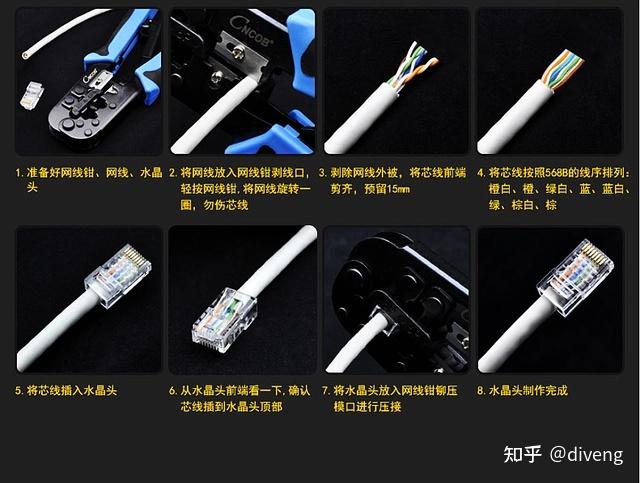
Strip Carefully: Use a quality cable stripper. Expose just enough conductor (about 1/2 inch / 12-13mm) – too much invites shorts, too little prevents proper contact.
-
Untwist Minimally: Untwist the pairs only as much as necessary to arrange them in order. Excessive untwisting degrades performance, especially in Cat6/6A.
-
Straighten & Align: Ensure all conductors are perfectly straight and aligned before inserting them into the RJ45 connector. A slight stagger can help insertion but keep twists close to the jacket.
-
Push to the End: Forcefully push the wires all the way to the front of the RJ45 connector. Look through the clear plastic end to verify all 8 wires are fully seated and in the correct order.
-
Quality Crimping is Key: Use a professional-grade RJ45 crimping tool with interchangeable dies suited for Cat5e/6 connectors. Apply firm, even pressure for a secure termination that pierces the insulation reliably.
-
Test EVERY Cable: Never skip testing with a basic cable tester (checks continuity/pinout) and ideally a certification tester (for performance metrics like crosstalk, length, attenuation) for critical installs.
Invest in Quality for Reliable Connections
Mastering the diagram is step one. Ensuring reliable, high-performance terminations consistently requires high-quality components:
-
RJ45 Connectors (Plugs): Choose plugs specifically rated for the cable category (Cat5e, Cat6, Cat6A). Look for features like:
-
Gold-plated contacts (50u" for better corrosion resistance and conductivity).
-
Robust strain relief boots (protect the termination point).
-
Load bars or staggered contacts (essential for Cat6A, helpful for Cat6) to maintain pair separation and reduce crosstalk.
-
Transparent bodies for easy visual verification.
-
-
Cable: Use certified Cat5e, Cat6, or Cat6A UTP (Unshielded Twisted Pair) or STP (Shielded Twisted Pair) cable as required. Pure copper conductors (not CCA - Copper Clad Aluminum) are mandatory for PoE and performance.
-
Tools: Invest in professional strippers, cutters, and a reliable crimper with the correct dies.
(Product Focus Image Suggestion: *A well-lit, attractive product shot showcasing your company's premium RJ45 connectors (Cat5e and Cat6 variants), highlighting key features like gold plating, load bars (if applicable), and strain relief boots. Include a professional crimping tool in the shot.)*
Conclusion: Wire It Right the First Time
Understanding and applying the correct RJ45 wiring diagram (T568A or T568B consistently) is fundamental for building a robust and high-performance network. By following the diagrams provided, adhering to the pro tips, and investing in quality connectors and tools, you ensure maximum signal integrity, PoE compatibility, and network reliability. Whether you're terminating cables on-site or sourcing components for global distribution, precision matters.
Master RJ45 Connector Pinouts: The Ultimate Guide to T568A vs T568B Wiring
Avoid Downtime! How Quality RJ45 Modular Jack Connectors Prevent Costly Network Failures
Related Article