Wiring Diagram for RJ45 Connector (T568A & T568B) – Clear Color Codes and Step-by-Step Guide
RJ45 connectors are the foundation of Ethernet cabling, whether you are wiring a home network, supporting office installations, repairing existing lines, or working on production lines in a factory. Understanding the correct wiring diagram for an RJ45 connector is essential for achieving reliable network performance.
This guide explains the T568A and T568B wiring standards with accurate color codes, pinout descriptions, and clear step-by-step wiring instructions. The content is written based on years of practical experience in network cabling and Ethernet connector manufacturing.
1. Understanding the RJ45 Connector
An RJ45 connector is an 8P8C (8 Positions, 8 Contacts) modular plug commonly used for Ethernet networks.
Although T568A and T568B use different color orders, the connector’s physical design is the same.
Key parts of an RJ45 plug include:
-
8 metal pins
-
Locking tab
-
Cable alignment channels
-
Strain-relief area
A correct wiring sequence ensures signal integrity and stable Ethernet speed.
2. T568A vs. T568B Wiring Standards
Globally, Ethernet cabling uses two primary wiring standards:
-
T568A — common in government and older installations
-
T568B — the most widely used in home and commercial networks
Both standards perform equally well. The only difference is the color order.
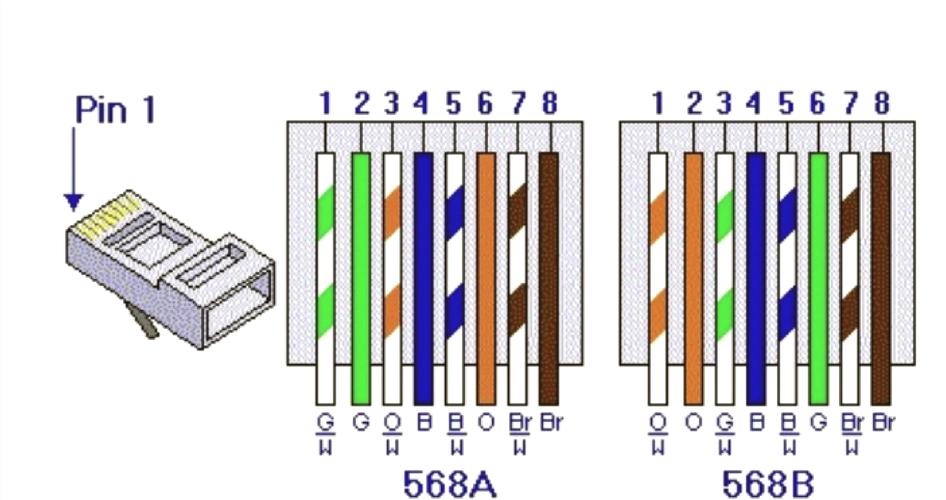
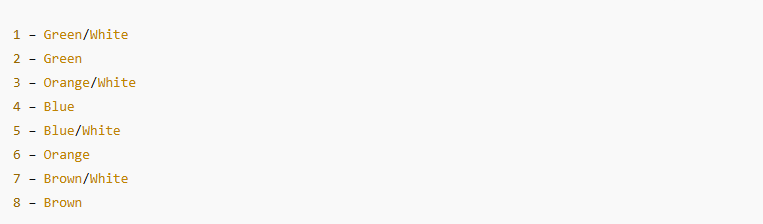
T568A Color Order (Pin 1–8):
-
Green/White
-
Green
-
Orange/White
-
Blue
-
Blue/White
-
Orange
-
Brown/White
-
Brown
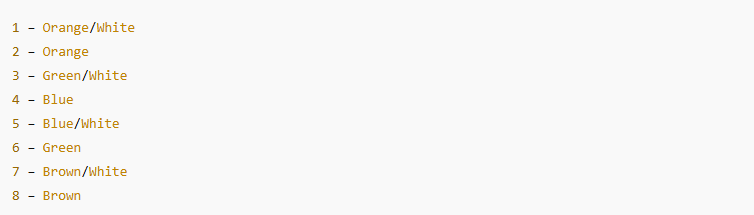
T568B Color Order (Pin 1–8):
-
Orange/White
-
Orange
-
Green/White
-
Blue
-
Blue/White
-
Green
-
Brown/White
-
Brown
3. Wiring Diagram for RJ45 Connector
Below are simplified diagrams for quick reference:
T568A Diagram
T568B Diagram
If you need, I can generate a professional visual diagram as an image.
4. Cable Types Compatible with RJ45
| Cable Type | Frequency | Speed | Usage |
|---|---|---|---|
| Cat5e | 100 MHz | 1 Gbps | Home/office |
| Cat6 | 250 MHz | 1–10 Gbps (short) | High-speed LAN |
| Cat6A | 500 MHz | 10 Gbps | Data centers |
| Cat7 | 600+ MHz | 10 Gbps | Industrial / special cases |
Each category requires the same wiring diagram, but shielding and performance differ.
5. How to Wire an RJ45 Connector (Step-by-Step)
These steps work for both beginners and technicians:
Step 1 — Prepare Tools
-
RJ45 plugs
-
LAN cable (Cat5e / Cat6 / Cat6A)
-
Wire stripper
-
Crimping tool
-
Cable tester (recommended)
Step 2 — Strip the Outer Jacket
Remove about 2–3 cm of outer insulation without cutting the inner wires.
Step 3 — Untwist and Arrange the Pairs
Select T568A or T568B and straighten the wires according to the color order.
Step 4 — Trim the Wires
Cut to a uniform length (approx. 12–13 mm).
Step 5 — Insert Into the RJ45 Plug
Ensure each wire reaches the end of its pin channel.
Step 6 — Crimp the Connector
Use the crimping tool to press the pins firmly into the wires.
Step 7 — Test the Cable
A tester ensures correct 1–8 mapping and verifies Ethernet speed compatibility.
6. Common Wiring Problems and Fixes
| Issue | Cause | Solution |
|---|---|---|
| No signal | Wrong wire order | Re-crimp following T568A/B |
| Connection drops | Twisted pairs loosened | Keep pair twist close to the plug |
| Only 100 Mbps speed | Pins 1, 2, 3, 6 incorrect | Rewire using correct standard |
| Bad contact | Wires not fully inserted | Reinsert and crimp again |
These issues are extremely common in field work, especially among DIY installers.
7. About Jiaxun – Professional RJ45 Connector Manufacturer
To ensure long-term network stability, choosing a reliable connector manufacturer is crucial.
Jiaxun is a professional factory specializing in network connectivity components, supplying customers worldwide.
Why Jiaxun Is Trusted by Global Clients
-
20+ years of manufacturing experience
-
Complete product range — RJ45 plugs, modular jacks, LAN transformers, PoE components, etc.
-
OEM/ODM capability — Custom pinout, shielding design, or wiring structure
-
Strict quality control — UL / CE / RoHS compliant
-
Engineering support — Helps clients optimize electrical performance and mechanical design
For large-volume purchasing, OEM projects, or connector customization, Jiaxun provides a stable and cost-effective solution.
8. Final Thoughts
Understanding the wiring diagram for an RJ45 connector is essential for anyone working with Ethernet networks.
Once you follow the correct color sequence and wiring steps, creating a reliable cable becomes straightforward.
Whether you’re handling a home installation or sourcing components for mass production, choosing high-quality connectors—like those manufactured by Jiaxun—ensures better performance and fewer failures in long-term use.
RJ45 Port Explained: Types, Functions, Applications & How to Choose the Right Connector
RJ45 Jack Connector: Types, Pinouts, Applications & OEM Guide
Related Article